
Removing an Admin
The player must be online on your server to do the steps below.1. Log in to the Host Havoc game panel.
2. Navigate to the Web Console.
3. Enter the command
/op remove USERNAME, replacing "USERNAME" with the player's username.Removing an Offline Admin
If the player is not online on your server but you want to remove them as an admin, follow the steps below.1. Identify the player's UUID (How to Get a Hytale Player's UUID).
2. Log in to the Host Havoc game panel and stop your server.
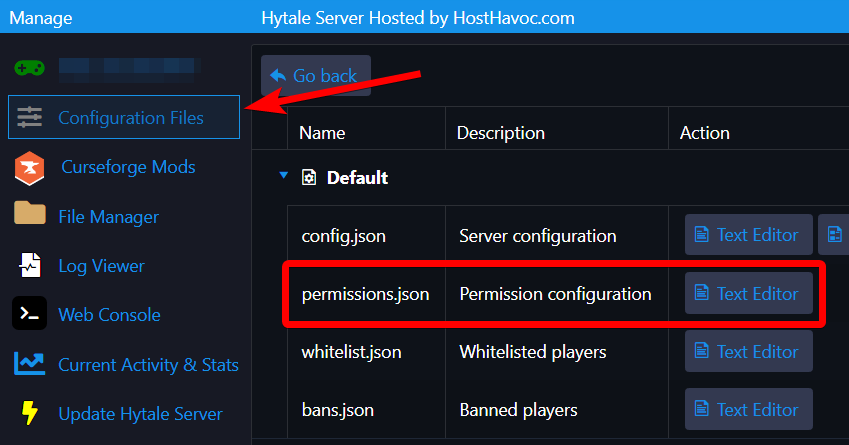
3. Navigate to the Configuration Files page.
4. Open the permissions.json file by clicking on the Text Editor button.
 7. Look for the UUID of the player and remove the line that says "OP" under their "groups".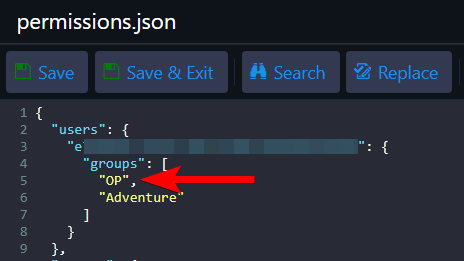
You should have something that looks like this:
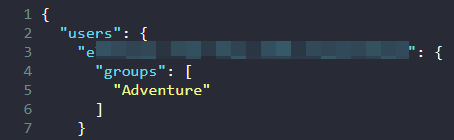
8. Click Save & Exit.
Once you start your server, the player will no longer have admin/operator access to your server.
If you need further assistance, please submit a support ticket, and our team will be happy to assist you.
