
A more reliable way to identify players in Hytale is through their UUID (Universally Unique Identifier) as these do not change even if a player changes their username multiple times.
You can use UUIDs to accurately manage players in your Hytale server, which is especially useful when you are setting up whitelisting, permissions, kicks, bans, etc.
1. Log in to the Host Havoc game panel and stop your server.
2. Navigate to the Web Console.
3. Enter the command
This process may take some time, depending on the number of players who have joined your server.
1. Log in to the Host Havoc game panel.
2. Navigate to the File Manager.
3. Go to this directory:
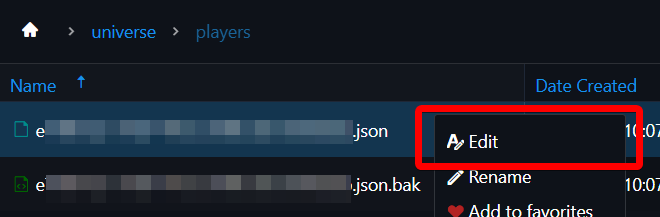
4. Go through the .json files by right-clicking on these and clicking Edit.
5. With each .json file you open, look for the "Text" value under the Nameplate section that matches the username of the player you are looking for.
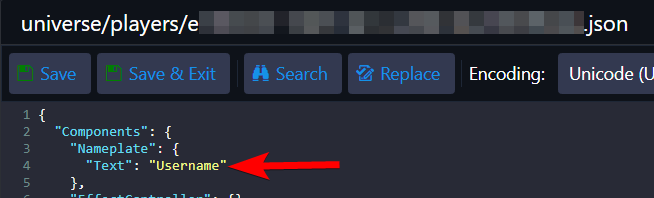
6. Once you have located the file that contains the username of the player, you can identify their UUID through the file's name. The player UUID is the string of characters that comes before the .json extension: [Player_UUID].json
If you need further assistance, please submit a support ticket, and our team will be happy to assist you.
You can use UUIDs to accurately manage players in your Hytale server, which is especially useful when you are setting up whitelisting, permissions, kicks, bans, etc.
Method 1: Get an Online Player's UUID
The player must be online on your server to do the steps below. If the player is offline or not logged into your server, use Method 2.1. Log in to the Host Havoc game panel and stop your server.
2. Navigate to the Web Console.
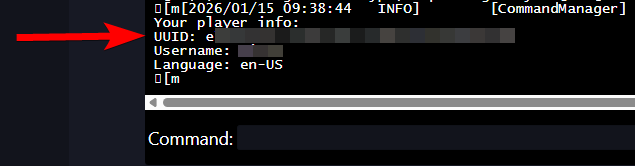
3. Enter the command
/uuid USERNAME, replacing "USERNAME" with the player's username. You should receive a message in the console displaying the player's details, including their UUID. Method 2: Get an Offline Player's UUID
These are the steps to follow when you want to get the UUID of the player who is offline/not logged in on your server.This process may take some time, depending on the number of players who have joined your server.
1. Log in to the Host Havoc game panel.
2. Navigate to the File Manager.
3. Go to this directory:
universe\players\. You will find all the player files in this folder.4. Go through the .json files by right-clicking on these and clicking Edit.
5. With each .json file you open, look for the "Text" value under the Nameplate section that matches the username of the player you are looking for.
6. Once you have located the file that contains the username of the player, you can identify their UUID through the file's name. The player UUID is the string of characters that comes before the .json extension: [Player_UUID].json
If you need further assistance, please submit a support ticket, and our team will be happy to assist you.
